Thursday, June 1, 2017

BlockFractal: generator of blocky fractal-like shapes

The frabjous isle of North Osia
BlockFractal is an algorithm that generates blocky fractal-like shapes.  The idea is to make something that would be suitable for a continent, island, or lake, in a procedurally generated 2d tile-based game.  The demo page shows the generated shape with a Google-Maps-like interface, where you can zoom and pan around.

First it generates a random place name, like New Gharnia, Superior Iukauton, or Twuq'eros.  That name is used as a random seed to generate a random fractal.  You can enter your own place name, and you can control two properties of the fractal generation.

One is "iterations".  This sets how many times the BlockFractal algorithm is run on the initial seed shape.  The initial shape is a simple square, but each iteration adds finer and finer random detail to it.  Drag the iterations slider around to see how the shape was built.

The other is "variation".  This basically affects the craziness of the shape.  Low variation produces a simpler but blockier shape.  High variation produces a shape with many more twists and turns.  Somewhere in the middle seems to be pretty good for continent-looking shapes.

Seed square
Iteration in progress
New shape after first iteration

There's a thorough description of the algorithm at the Algorithm Overview page on the github site, but basically it goes like this:  Take the initial seed shape (a 2x2 square in the first of the three example images above), double it, and then for each unit edge make a random decision to leave it be or to move it "inward" or "outward".  That produces a new shape which is more complicated, and around twice as big, as the last one.

The frumious land of Yixonia
Repeat this algorithm as many times as you like, though it does take twice as much memory with each iteration, so to avoid memory issues I stopped the demo at 9 iterations.

There are a few edge cases to consider, for instance I don't want the path to intersect itself.  If you're curious the Algorithm Overview page has more details.

The resulting shapes make me think of Koch snowflakes and quadric fractals.  Also, check out Brainfilling Curves, for some similar and amazing shapes.

As you play with the demo, imagine if this were the high-level map of a top-down RPG or roguelike game.  I like the idea of scattering some different biomes and rivers around, randomly placing some cities and towns, and maybe using some Delaunay triangulation to connect them with roads.

Sunday, May 28, 2017

WarpField: portal-casting field-of-view algorithm

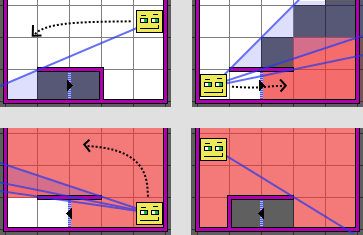
Here's WarpField, a "portal-casting" field-of-view algorithm.  This goes beyond the usual field-of-view mechanism by adding support for portals.  A portal basically connects an edge between tiles in one map with an edge in a (possibly different) map.  WarpField computes the field of view through the portal, and also returns what the player can see at each location.  This could be useful for:
Going up (or down) stairs.
  • Continuous overworld movement from zone to zone
  • Over/under pathways, such as bridges and tunnels
  • Smooth transitions of elevation changes, like stairs
  • Crazy magical effects, like portals to alternate dimensions.
In a previous post, I discussed WallyFOV, my implementation of a 2d grid-based field-of-view algorithm using shadow-casting.  For games that don't need portals, that algorithm is a better choice, since it's simpler and faster.  Unlike many field-of-view implementations, WallyFOV supports walls, which is a prerequisite for adding portal support.

"Portal-casting" is basically an extension of shadow-casting.  Shadow-casting tracks contiguous ranges of angles of rays that are visible from the player.  When a wall is encountered, we simply cut that range of angles out (causing a shadow).  For portals, instead of cutting that range out, we split it off into a new, separate range.  For each range we track which map the range "sees", and the relative tile offset into that map.

Entering a tunnel.
For each location that isn't completely in a shadow, we now have to decide which map we're seeing at that location, and which tile in that map goes there.  This can be tricky, because we might see the location more than one way at a time.  Maybe some rays reach the location after passing through a warp to map A, while others reach it after a warp to map B, and some reach it without passing through any warps at all.  In a 2D tile-based game we don't really want to show slices of a tile, we want to just pick one to show.  To resolve this ambiguity, WarpField has an order of preference: rays closest to the center are preferred, followed by rays that go through fewer warps, and finally ties are broken by the map with the lowest "id".

There are a lot of edge cases to consider, and most of them are touched upon in the algorithm overview.  I did a lot of testing and benchmarking, and I'm pretty sure it works according to spec, but there are some asymmetries that I'd like to remove (due to the order in which locations are visited).  I think I can clean that up by switching to fractional math instead of floating-point math.  Nevertheless, it's fairly robust, you can throw crazy cases at it like warps into the same map (such that the player can see themself through it), and rays that pass through many warps at once.

I think this could add a lot of potential to roguelike games.

Monday, May 15, 2017

WallyFOV: Shadow-casting field-of-view implementation with walls


I've been working on a field-of-view algorithm for 2d tile-based games (e.g. roguelikes).  There's a particular killer feature I mean to include in the algorithm, which I won't reveal in this post, but I decided to go ahead and release the slightly simpler version because I think it might be useful on its own.

It's called WallyFOV.  It's basically an implementation of recursive shadowcasting in TypeScript, but with support for walls.

Go ahead and check out the demo.  (and thanks to EasyStar.js for the pathfinding algorithm used in that demo, and from which I kindof copied the demo page style)

Recursive shadowcasting works by scanning outwards from the player looking for obstructions.  When something is found, a shadow (represented by two angles) is added to a shadow list.  Overlapping shadows are merged to keep the algorithm running quickly.

In this particular variant, a tile is considered visible if there exists any line from the center of the player's tile to any point within the target tile.  There are some complications around dealing with diagonally-adjacent bodies, which you can read about in the algorithm overview, but overall it's a pretty simple algorithm to understand.  It's a bit tricky to implement and optimize, however.

I spent a little extra time optimizing it to run in V8 (at least the version of V8 in node.js 7.9).  Along the way I learned how to use node's --trace-deopt, and discovered some very unexpected optimization tips, mainly having to do with newer ECMAScript features.

For instance, this version of V8 doesn't optimize "compound let/const assignment".  Meaning if you declare a variable with let or const, and then use something like X += Y, your function will be deoptimized.  Simply using X = X + Y instead avoids that trap.  The general lesson here is that JavaScript is apparently changing too rapidly to rely on the engine optimizing things according to your intuition.  This is probably true with any language, to a certain extent.  But, come on, X = X + Y?


Friday, January 27, 2017

Two Songs Arranged for Solo Piano

I've arranged two of my songs for solo piano, using MuseScore.  I had to make some changes in these arrangements compared to the originals, to remove or combine parts, and to make them physically possible to play.  I'm not a great pianist, but I made sure that I could play them through at a stop-and-think-about-the-next-part pace.  I think someone more skilled should be able to play them properly.

If you're that person I'd love to hear the result.  You can use the Download link at the MuseScore page for each piece to get printable versions of the scores.


The easier of the two, this one involves lots of many-fingered chords in both the right and left hands.  It's a mellow, ambient piece, and my most recent.


I made this one for Robot Quest.  At the time I called it "Plugged In", but I've renamed it because this name is much better.  A quick, boisterous, staccato piece, this one is very hard for me to play.

Sunday, December 18, 2016

Kendall Stories

Lala and Sing acting out an argument.
Here are some web animations I made for my daughter.  One day she asked me to cut a hole out of a cardboard box so she could use it as a TV.  She then made three "shows", and for each one she drew scenes on several sheets of paper.  To present the shows, she would hold the paper up to the hole in the box while the rest of us sat on the other side and watched.

I thought it would be cute to turn her drawings into SVG images and animate them, and to record her voice and sync it up with the animation.  She really got into it, giving me very strict directorial instructions.  Part of the challenge for me was to try not to "improve" on her work with my own ideas.  I tried to stay as true to her vision for the shows as possible, and I included all of her mistakes (that she didn't catch in post-production and demand that I fix).

Not gonna what?

I used GreenSock GSAP's TweenMax library for the animations, and howler.js for audio.  Both are overpowered for this kind of project, but they saved time that I would have spent dealing with little headaches.  For instance you can't trigger HTML5 audio directly on mobile browsers.  I should have found a library for preloading and sizing images, because I ended up with some frustrating work making sure image sizes were loaded properly for IE.


Sunday, November 27, 2016

Word Search Generator

Here's a quickly-slapped-together little project that generates word search puzzles.

I've been kicking around an idea for a kind of "evil" word search, in which there are tons of letter combinations that almost spell words, but don't.  The trick would be to see how distracting the almost-words are, and whether that makes the correctly-spelled words harder to find.  That's not what this one is, though.  This one is just a regular, non-evil word search generator.

The core generator code is at this githib repo, or on npm as @sbj42/word-search-generator.

Sunday, November 20, 2016

Mr. Floppypants

Here's Mr. Floppypants.  A simple ragdoll-physics game.  Maybe it's about a very lazy person who needs to be forced to go explore and have fun.

It's based loosely on a "Chrome experiment" called Boingy, which the kids really got a kick out of.  I think they mostly liked dropping stuff on the poor protagonist, or forcing it to fall down stairs, or getting it twisted up into painful-looking poses.  After I played a bunch of MANYGOLF and through that learned about the p2.js javascript physics engine, I thought I'd make a more complicated version of my own.

It seems to work in Chome, Firefox, and Edge.  It does not work in IE.

Basically you click and drag to toss the guy around.  For more advanced play, if you click on his hand and drag it to something then he'll "grab" the thing.  You can use this to carry an item with you to some other part of the world, and to operate the car.


This game isn't nearly finished yet.  I was hoping to make the world a lot larger, and to add other characters to meet and also toss around.  If you get any ideas for things I could add to the game, let me know in the comments below.